Okay, I'm sure I could search for this information...but screw it. Anyone know of a good flight simulator for practicing IFR stuff on a computer.
I do not have an IFR rating just lots of bush flying. I have a good computer. I just want to learn/teach myself some proper IFR "procedures". A buddy of mine has the books and such (and the rating), so i thought, to kill some time on rainy days I'd figure out what the hell the IFR world is all about.
So, I'm interested in a good simulator to install and run. I've heard Microsoft Flight Sim is pretty good....but I figure I'd put the question to the experts here in training.
Please...simple answers.
Thanks
Flight Simulators for practicing IFR
Moderators: Right Seat Captain, lilfssister, North Shore, sky's the limit, sepia, Sulako
-
iflyforpie
- Top Poster

- Posts: 8132
- Joined: Tue Apr 15, 2008 12:25 pm
- Location: Winterfell...
Re: Flight Simulators for practicing IFR
I have an IFR rating I don't currently use, but having a flight sim at home really helped my training along.
I use X-Plane 9 currently but back when I was a PC user Microsoft Flight Sim was good as well.
It doesn't matter what you use really. Most sims have all the proper navaids and display the information the same way as real aircraft--from six packs and CDIs to glass to synthetic vision and HUDs on the really advanced aircraft.
Things I have trouble with are selecting navaids in real-time since it usually involves clicking the screen or memorizing key commands.
Most sims are far more sensitive than real aircraft so it forces you to really concentrate on your scan. Other things like equipment reliability and real-time weather are often available in most flight sims.
I use X-Plane 9 currently but back when I was a PC user Microsoft Flight Sim was good as well.
It doesn't matter what you use really. Most sims have all the proper navaids and display the information the same way as real aircraft--from six packs and CDIs to glass to synthetic vision and HUDs on the really advanced aircraft.
Things I have trouble with are selecting navaids in real-time since it usually involves clicking the screen or memorizing key commands.
Most sims are far more sensitive than real aircraft so it forces you to really concentrate on your scan. Other things like equipment reliability and real-time weather are often available in most flight sims.
Geez did I say that....? Or just think it....?

Re: Flight Simulators for practicing IFR
I'm in the market for a good quality used IFR rating, how much do you want for yours?iflyforpie wrote:I have an IFR rating I don't currently use, but having a flight sim at home really helped my training along.

Anyhow, MS Flight Sim worked well the bit I used it, I hate flying with a keyboard (ok no airbus jokes here)
No trees were harmed in the transmission of this message. However, a rather large number of electrons were temporarily inconvenienced.
Re: Flight Simulators for practicing IFR
So X-Plane 9 and or Microsoft flight sim mixed with some "reading the proper material" and a guy can learn a lot about IFR procedures?
Any other suggestions out there?
Thanks a lot so far
Any other suggestions out there?
Thanks a lot so far
-
just curious
- Rank Moderator

- Posts: 3592
- Joined: Mon Feb 23, 2004 9:29 am
- Location: The Frozen North
- Contact:
Re: Flight Simulators for practicing IFR
Go with flightsim X, and pick an airplane you wanna start in, like a DHC-6 or a Beech 200, and get the add-on.
Get an expired Cap for a region you don't normally fly in, and fly those approaches. Read the AIM, IPM and CAP Gen veerrry thoroughly.
Get an expired Cap for a region you don't normally fly in, and fly those approaches. Read the AIM, IPM and CAP Gen veerrry thoroughly.
Re: Flight Simulators for practicing IFR
dude, I think this is the exact kind of info I'm lookin for. thanks man. Can you give me more detailed information though:
What is flightsim X?
Is this a microsoft product...is it the newest one or something? (yes I'm out of the loop). Where can I buy it, online I guess? And the addons? Can just buy those online as well I suppose?
Since you seem pretty helpful....do you recommend a control interface? Just a joystick with toggle switches/throttle/hatswitch? Is that enough? Anyhoo...thanks a lot so far.
What is flightsim X?
Is this a microsoft product...is it the newest one or something? (yes I'm out of the loop). Where can I buy it, online I guess? And the addons? Can just buy those online as well I suppose?
Since you seem pretty helpful....do you recommend a control interface? Just a joystick with toggle switches/throttle/hatswitch? Is that enough? Anyhoo...thanks a lot so far.

Re: Flight Simulators for practicing IFR
Flight sim X (or 10) is a MS app, and is GREAT for practice!! it even shows a "profile" outlining your ground track and altitude paths..
If you can, use dual displays, so you can show your radio stack along side the aircraft panel.
you should be able to buy it at any small computer/gaming store (I bought mine at London Drugs in Thunder Bay)
S
If you can, use dual displays, so you can show your radio stack along side the aircraft panel.
you should be able to buy it at any small computer/gaming store (I bought mine at London Drugs in Thunder Bay)
S
Rule books are paper - they will not cushion a sudden meeting of stone and metal.
— Ernest K. Gann, 'Fate is the Hunter.
— Ernest K. Gann, 'Fate is the Hunter.
-
The Old Fogducker

- Rank (9)

- Posts: 1784
- Joined: Tue Mar 23, 2004 5:13 pm
Re: Flight Simulators for practicing IFR
I Had a long reply typed in and then lost it!
Get a control column similar to this http://www.chproducts.com/retail/yokes.html
Use either Micro-Soft's Flight Simulator 2004 "A Century of Flight" or X Plane ... either one has good support via forums similar to this one.
Take a look at http://www.mycockpit.org to see what some folks are building and flying in their basements using Flight Simulator as the core program with many add-on AC types available.
I'd suggest not buying Flight Simulator X, as it requires a lot of hardware to get it working really well. 2004 is a little old, but quite capable.
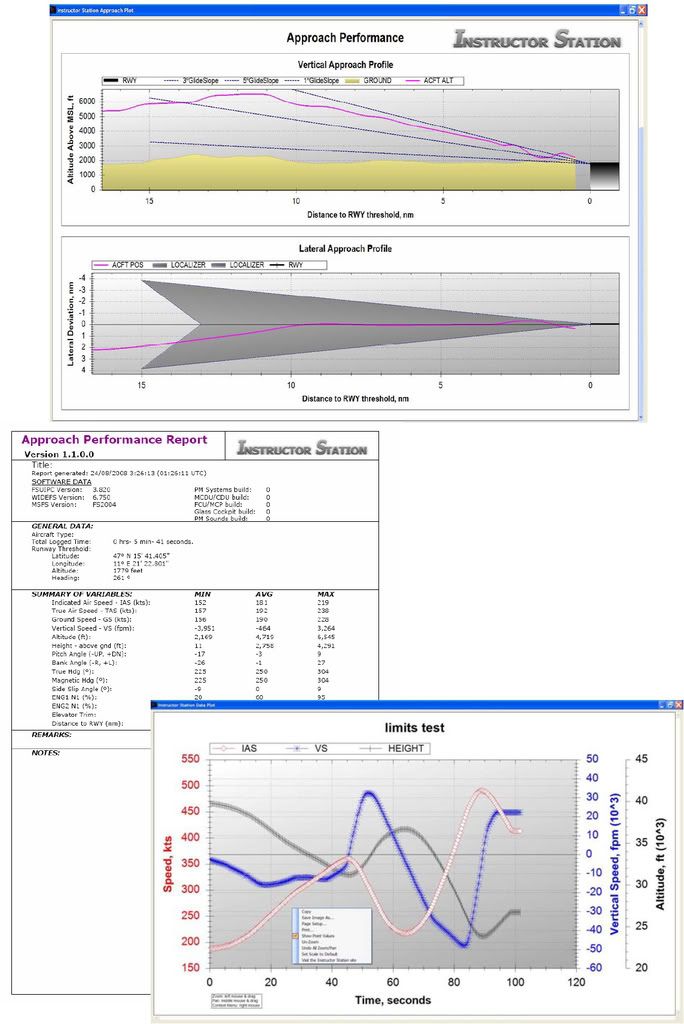
Also, there are neat "Instructor Station" programs which can be downloaded and added on.
Next suggestion, make absolutely certain you are being taught by someone who knows what they are doing .... you'll find that it takes a whole lot of effort and money to "unlearn" something you've been taught incorrectly the first time.
I'd say don't bother with "high zoot" AC types like the Beech 200, or Dash 6, and concentrate on basic procedures ... "I fly this heading for 2 minutes, turn this way for 45 seconds, set the OBS to ..... then I'll ..." Forget about the quirks of higher performance simulator airplanes for a little while.
Today's home PCs are far better than the electro-mechanical type FTDs of 30 years ago, and are so much better than the early PC based FTDs of 10 years ago, its amazing.
The training device is superb, and indeed a far better learning environment than the airplane, so don't be in a rush to get your hands on an airplane.
Best wishes on getting into the IFR world.
Fogducker
Get a control column similar to this http://www.chproducts.com/retail/yokes.html
Use either Micro-Soft's Flight Simulator 2004 "A Century of Flight" or X Plane ... either one has good support via forums similar to this one.
Take a look at http://www.mycockpit.org to see what some folks are building and flying in their basements using Flight Simulator as the core program with many add-on AC types available.
I'd suggest not buying Flight Simulator X, as it requires a lot of hardware to get it working really well. 2004 is a little old, but quite capable.
Also, there are neat "Instructor Station" programs which can be downloaded and added on.
Next suggestion, make absolutely certain you are being taught by someone who knows what they are doing .... you'll find that it takes a whole lot of effort and money to "unlearn" something you've been taught incorrectly the first time.
I'd say don't bother with "high zoot" AC types like the Beech 200, or Dash 6, and concentrate on basic procedures ... "I fly this heading for 2 minutes, turn this way for 45 seconds, set the OBS to ..... then I'll ..." Forget about the quirks of higher performance simulator airplanes for a little while.
Today's home PCs are far better than the electro-mechanical type FTDs of 30 years ago, and are so much better than the early PC based FTDs of 10 years ago, its amazing.
The training device is superb, and indeed a far better learning environment than the airplane, so don't be in a rush to get your hands on an airplane.
Best wishes on getting into the IFR world.
Fogducker
-
just curious
- Rank Moderator
- Posts: 3592
- Joined: Mon Feb 23, 2004 9:29 am
- Location: The Frozen North
- Contact:
Re: Flight Simulators for practicing IFR
http://cgi.ebay.com/MICROSOFT-FLIGHT-SI ... 7C294%3A50
http://www.simshack.net/product_info.ph ... cts_id=128
Here's a start. I'll talk about applying it later today.
http://www.simshack.net/product_info.ph ... cts_id=128
Here's a start. I'll talk about applying it later today.
-
iflyforpie
- Top Poster
- Posts: 8132
- Joined: Tue Apr 15, 2008 12:25 pm
- Location: Winterfell...
Re: Flight Simulators for practicing IFR
Since you have to do the ride and the written to make it valid again, (been quite a while) I'll sell it for $50 or a 24 of the second cheapest beer you can find.Invertago wrote:I'm in the market for a good quality used IFR rating, how much do you want for yours?iflyforpie wrote:I have an IFR rating I don't currently use, but having a flight sim at home really helped my training along.

Geez did I say that....? Or just think it....?
Re: Flight Simulators for practicing IFR
I started looking at these two sims online: X-Plane and Microsoft X. The "ads" definitely seem to focus on simulating flight and the world around you...none of which I'm too interested in...although the pictures are "pretty".
So I guess I'd like to confirm that they are pretty great for having accurate instrumentation and running through "procedures" and honing skills on instruments. Not to mention just learning how to use the instruments from simple to complex. The beaver pilot I'm flying with this summer did an IFR rating this winter so we were gonna tinker with the sims so that I could learn some of these "procedures" off of him....so that I can do an IFR this winter and have an idea what its all about.
Anyhoo...thanks for the help and keep the suggestions coming.
So I guess I'd like to confirm that they are pretty great for having accurate instrumentation and running through "procedures" and honing skills on instruments. Not to mention just learning how to use the instruments from simple to complex. The beaver pilot I'm flying with this summer did an IFR rating this winter so we were gonna tinker with the sims so that I could learn some of these "procedures" off of him....so that I can do an IFR this winter and have an idea what its all about.
Anyhoo...thanks for the help and keep the suggestions coming.
Re: Flight Simulators for practicing IFR
Go buy FS9 for 20$ with a Yoke that has throttle on it (or a joystick, whatever, it doesn't matter) and practice with it. FSX is more expensive, is more ressource hungry and doesn't make a difference when it comes to practicing IFR, unless you want to have someone with your in the cockpit to help you.
Amazon.com has FS9 for 20$
http://www.amazon.com/exec/obidos/tg/de ... s&n=468642
Amazon.com has FS9 for 20$
http://www.amazon.com/exec/obidos/tg/de ... s&n=468642
Going for the deck at corner
-
iflyforpie
- Top Poster
- Posts: 8132
- Joined: Tue Apr 15, 2008 12:25 pm
- Location: Winterfell...
Re: Flight Simulators for practicing IFR
I got X-Plane 9 (the latest version) for $35 US. Scenery accuracy isn't that great, but the flight modeling is far more realistic than FS. Weather is rendered really good too, good for a challenge when breaking out at minimums and going visual.
Geez did I say that....? Or just think it....?
-
The Old Fogducker
- Rank (9)
- Posts: 1784
- Joined: Tue Mar 23, 2004 5:13 pm
Re: Flight Simulators for practicing IFR
Boozy:
Yes, the software will do a fine job of acting like an FTD that you'd find at a school that teaches IFR. You'll be able to fly and learn IFR procedures just fine.
I took a moment to refresh myself on the Instructor Station that "plugs into" Flight Simulator 9 (also known as Flight Simulator 2004, A Century of Flight) and here's a link to the main page. http://luisgordo.googlepages.com/instructorstation Be sure to look at the "Screenshots" link.
To see the kind of info it will save and present for you, jump to this link describing flight profiles of a person having flown an ILS approach. http://img.photobucket.com/albums/v289/ ... oaches.jpg
Again, nothing wrong with any of the above suggestions, its just the number of add-ons and support for FS9 is immense. X-Plane does have a slightly better flight dynamics section of the program, but there are other add-ons for FS9 which will allow a person to enter FS9 and do a lot of tweaking of the aircraft's performance, but frankly, for what you're proposing to do, you'll just never need it. Nor will you notice the flying difference between X-Plane or FS9.
Anyway Boozy, I'll leave you to your decision.
Fog
Yes, the software will do a fine job of acting like an FTD that you'd find at a school that teaches IFR. You'll be able to fly and learn IFR procedures just fine.
I took a moment to refresh myself on the Instructor Station that "plugs into" Flight Simulator 9 (also known as Flight Simulator 2004, A Century of Flight) and here's a link to the main page. http://luisgordo.googlepages.com/instructorstation Be sure to look at the "Screenshots" link.
To see the kind of info it will save and present for you, jump to this link describing flight profiles of a person having flown an ILS approach. http://img.photobucket.com/albums/v289/ ... oaches.jpg
Again, nothing wrong with any of the above suggestions, its just the number of add-ons and support for FS9 is immense. X-Plane does have a slightly better flight dynamics section of the program, but there are other add-ons for FS9 which will allow a person to enter FS9 and do a lot of tweaking of the aircraft's performance, but frankly, for what you're proposing to do, you'll just never need it. Nor will you notice the flying difference between X-Plane or FS9.
Anyway Boozy, I'll leave you to your decision.
Fog
Re: Flight Simulators for practicing IFR
I wonder if flight schools are loosing any money because people are using their own pc based simulators at home? it's funny how they( some flight schools) still push their sim's like it's something differnet than your computer and it cost 40-150bucks an hour!. I feel it's basically the same especially in flight sim x there are features that alow you to look left and right out the cockpit so you can even do circling on you computer no problem, add customzed weather and failures..etc. Unless you are at flight safety or CAE traing in a full motion sim it's no different.
(sorry flight schools the truth is out)
(sorry flight schools the truth is out)
-
iflyforpie
- Top Poster
- Posts: 8132
- Joined: Tue Apr 15, 2008 12:25 pm
- Location: Winterfell...
Re: Flight Simulators for practicing IFR
The flight sim needs to be certified to log time. So unless you are burning fuel, which is more expensive, a school flight sim is still a deal.
Also they typically have a better control setup (unless you want to be a sim nerd and spend a ton of money on yokes, pedals, quadrants, and radio stacks); and there is an instructor to give you clearances, vectors, and failures.
Also they typically have a better control setup (unless you want to be a sim nerd and spend a ton of money on yokes, pedals, quadrants, and radio stacks); and there is an instructor to give you clearances, vectors, and failures.
Geez did I say that....? Or just think it....?
Re: Flight Simulators for practicing IFR
I have an ATPL and I always fly IFR but since the ceiling is above the MSA most of the time, and we use the GPS, and we have vectors, and the winds at 3000 feet are 20 kts or less most of the time, etc... we don't have the chance to shoot too much challenging approaches for real. Therefore, it's easy to loose your skill (especially when you're 2 weeks off per month).
To maintain my IFR skill, I have fs2004 on my laptop and every week, I take-off from an airport, shoot a NDB, VOR and ILS approach, overshoot, do a hold, do DME arcs, etc... with 50 kts of x-wind, head wind, tail wind, etc... fs2004 is the only sim I use but I think it's really good. It is user friendly and it is really cheap (You will find a used one for less than 20$).
I use a joystick (a cheap one will cost you 30$) and a mouse (It's pain in the ass to use the one from the laptop). If your laptop is not too much powerful, lower all the settings to minimum, and always fly with 0 visibility, it's easier on the computer (all you need is your instruments anyway). I use the Cessna 172, so I can practice approaches with straight ADF and straight VOR, with max power all the time to fly the approaches at 120 kts at least. Don't use the autopilot or the flight director, so you will practice your instrument scanning.
Of course, if you never flew IFR before, start by intercepting radials and routes, outbound and inbound, without any wind. Before using FS2004, practice with Tim's Air Navigation Simulator, http://www.visi.com/~mim/nav/, you will loose less time configuring everything than with fs2004. When you are comfortable with Tim's, go with fs2004.
Don't learn to fly IFR in the air. Learning to fly IFR on the ground is free. The instructor shouldn't have to teach you how to intercept a radial in the air, this has to be done on the ground. Especially that your brain will be busy enough dealing with emergencies. Anyway, that's the way I see it. Good luck!
To maintain my IFR skill, I have fs2004 on my laptop and every week, I take-off from an airport, shoot a NDB, VOR and ILS approach, overshoot, do a hold, do DME arcs, etc... with 50 kts of x-wind, head wind, tail wind, etc... fs2004 is the only sim I use but I think it's really good. It is user friendly and it is really cheap (You will find a used one for less than 20$).
I use a joystick (a cheap one will cost you 30$) and a mouse (It's pain in the ass to use the one from the laptop). If your laptop is not too much powerful, lower all the settings to minimum, and always fly with 0 visibility, it's easier on the computer (all you need is your instruments anyway). I use the Cessna 172, so I can practice approaches with straight ADF and straight VOR, with max power all the time to fly the approaches at 120 kts at least. Don't use the autopilot or the flight director, so you will practice your instrument scanning.
Of course, if you never flew IFR before, start by intercepting radials and routes, outbound and inbound, without any wind. Before using FS2004, practice with Tim's Air Navigation Simulator, http://www.visi.com/~mim/nav/, you will loose less time configuring everything than with fs2004. When you are comfortable with Tim's, go with fs2004.
Don't learn to fly IFR in the air. Learning to fly IFR on the ground is free. The instructor shouldn't have to teach you how to intercept a radial in the air, this has to be done on the ground. Especially that your brain will be busy enough dealing with emergencies. Anyway, that's the way I see it. Good luck!
Re: Flight Simulators for practicing IFR
Navajo, this is a great response. I really appreciate this. What you've said, along with the others is exactly what I've been asking/looking for. I agree with this "training on the ground" concept for IFR flying. That's why I started the thread. You've confirmed for me what I'll be doing then.
Thanks a lot folks,
Booozy
Thanks a lot folks,
Booozy
-
just curious
- Rank Moderator
- Posts: 3592
- Joined: Mon Feb 23, 2004 9:29 am
- Location: The Frozen North
- Contact:
Re: Flight Simulators for practicing IFR
Boozy, as you may have already discovered, most pilots these days use GPS derived data for navigation and approaches. Sadly, most people are assessed on rides using an ILS, and and ADF approach, and usually only get a GPS approach on the model competency check.
Using a flight sim program to review the basics of NDB and VOR holds and approaches is a good policy not just in preparation for an initial ride, but for re currency. I can fly all day with someone in a king air or twin otter sim to review those concepts since they pay 300 or so bucks an hour for the privilege. Prob'ly easier to take the advice of the guy from the Orange Bank, and "Save your money"
The instructor's panel and the operating instructions are two areas of a sim program to really look at. Setting up things like icing accumulation, and windshear are overkill and a genuine hindrance when you are trying to grasp a concept. Adding them to an approach when you have the checklists and things down cold are the final polish you really need.
Using a flight sim program to review the basics of NDB and VOR holds and approaches is a good policy not just in preparation for an initial ride, but for re currency. I can fly all day with someone in a king air or twin otter sim to review those concepts since they pay 300 or so bucks an hour for the privilege. Prob'ly easier to take the advice of the guy from the Orange Bank, and "Save your money"
The instructor's panel and the operating instructions are two areas of a sim program to really look at. Setting up things like icing accumulation, and windshear are overkill and a genuine hindrance when you are trying to grasp a concept. Adding them to an approach when you have the checklists and things down cold are the final polish you really need.
-
mcconnell14
- Rank 2

- Posts: 83
- Joined: Sun Jan 11, 2009 9:55 pm
Re: Flight Simulators for practicing IFR
MS flight sim X, 04 are the best, both are great, its the most realistic thing out there other than "real" simulators or real flying. definatly buy a joystick, or a yoke. can get some cheap (even look for used stuff) the great thing about MS sim X and 04 is that there are millions are add-ons for it (the game comes pretty simple, about 20 planes) but man can you ever make it realistic.
freeware and payware stuff.
you can put real airlines in the game, with there routes. ATC will use there real call signs (Air Canada 450, American 55 etc. )
theres even missions you can fly, some of then are very challenging, and will test even the most seasoned gamer, (pilot)
X-plane is great but dosent have the expandability that FSX or FS04, simply cuz there not as popular.
the game comes with pretty simple airplanes (they don't have FMC or anything), althought you can buy add-on (some you can find for free) that are called "level D" - which in a nut shell is no different from a real plane, except the fact its in your computer.
its great tho, the only crappy thing is that Microsoft shut down the program, amid the recession, so FS10 won't be out for a long time, now would be a good time to pick up FSX.
tips.
- you wont a really good computer to be able to play this game half decently (lots of ram and CPU speed)
-if you dont have VISTA yet, dont get it, as alot of add-on are a pain (espeiclly 64-bit machines) (aha just wat i went out to buy- big mistake)
do a youtube search for this game and you wont be disapointed
freeware and payware stuff.
you can put real airlines in the game, with there routes. ATC will use there real call signs (Air Canada 450, American 55 etc. )
theres even missions you can fly, some of then are very challenging, and will test even the most seasoned gamer, (pilot)
X-plane is great but dosent have the expandability that FSX or FS04, simply cuz there not as popular.
the game comes with pretty simple airplanes (they don't have FMC or anything), althought you can buy add-on (some you can find for free) that are called "level D" - which in a nut shell is no different from a real plane, except the fact its in your computer.
its great tho, the only crappy thing is that Microsoft shut down the program, amid the recession, so FS10 won't be out for a long time, now would be a good time to pick up FSX.
tips.
- you wont a really good computer to be able to play this game half decently (lots of ram and CPU speed)
-if you dont have VISTA yet, dont get it, as alot of add-on are a pain (espeiclly 64-bit machines) (aha just wat i went out to buy- big mistake)
do a youtube search for this game and you wont be disapointed
-
The Old Fogducker
- Rank (9)
- Posts: 1784
- Joined: Tue Mar 23, 2004 5:13 pm
Re: Flight Simulators for practicing IFR
Boozy, this topic piqued my interest and found a video on Youtube regarding the Instructor Station. Bear in mind most of this video is external shots.
In the game, you can set the screen views so that your computer monitor screen would be full of just the instruments panel, no, .. or next to no ...outside view.
Watch the video full screen, in HQ. Here's the link.
http://www.youtube.com/watch?v=KU68D4yS ... r_embedded
Pretty neat stuff.
Fog
In the game, you can set the screen views so that your computer monitor screen would be full of just the instruments panel, no, .. or next to no ...outside view.
Watch the video full screen, in HQ. Here's the link.
http://www.youtube.com/watch?v=KU68D4yS ... r_embedded
Pretty neat stuff.
Fog

Re: Flight Simulators for practicing IFR
And if you want to add another level, consider VATSIM http://www.vatsim.net-- will add pretty realistic ATC to the experience - and at no extra cost. Beats the socks off the default automated ATC, and you get live traffic to fly with.
Re: Flight Simulators for practicing IFR
The cheapest form of IFR procedure practice is a CAP and a cup of coffee. Flip through that book, throw your finger down on the diagram and fly the procedure with your finger. The CAP costs you what? $20? Or you can track down some old ones (or online ones) for free. Compare that to the $300 an hour you spent to fly an aircraft. $300 an hour, and what... maybe two or three full approaches? That was some of the best advice ever given to me. Thank you to my Aerocours instructor if you are on here!
On the topic of Flight sims. They are also great but for me they gave me a false sense of knowledge. First time I flew into a cloud (in real life) I thought I'd nail it with all my "practice". I was wrong. Nothing prepares you for the real white-out and bouncing you get yourself into in IMC conditions.
On the topic of Flight sims. They are also great but for me they gave me a false sense of knowledge. First time I flew into a cloud (in real life) I thought I'd nail it with all my "practice". I was wrong. Nothing prepares you for the real white-out and bouncing you get yourself into in IMC conditions.
-
jamesinator
- Rank 1

- Posts: 15
- Joined: Thu May 17, 2007 11:49 am
Re: Flight Simulators for practicing IFR
are there any programs for FS9 or FSX that addon the waypoints to the GPS for doing RNAV approaches?
Re: Flight Simulators for practicing IFR
FS actauly has the majority of the GPS fixes. You have to program it in the lfight planning section though. You can only do a direct to one waypoint at a time. YOu can not create a series of waypoints in the GPS (unless done prior to loading the flight)